
Direct and automated electronic invoice exchange pathways configured via D365.
Regulatory Mandate
UAE E-Invoicing Compliance
COMPLIANCE MILESTONE
To address upcoming mandatory UAE E-Invoicing regulations, Microsoft is embedding native, out-of-the-box compliance pipelines directly inside Dynamics 365 FinOps. This built-in integration eliminates architectural complexity and the heavy custom developments typically required to fetch and map localized invoice data.
Phase 1: Large Enterprises
Enforcement Date: January 1, 2027
Mandatory transition for high-turnover companies to digital exchange protocols based on the DCTCE(5-Corner) PEPPOL routing model.
Phase 2: SMEs & Others
Enforcement Date: July 1, 2027
Secondary deployment phase covering remaining SME entities under the standard PINT XML machine-readable billing formatting.
Overview Session Agenda
1- Understanding E-Invoicing
Fundamental standards, XML/UBL digital architectures, certified access points, and regulatory compliance.
2- System Configuration
Core system setups, ER parameters, Microsoft configuration repositories, and customer-specific VAT mapping.
3- Automation Scenarios
Advanced SFTP/REST API routes, SharePoint integration, and automated dispatch via Microsoft Power Automate.
4- Live Execution & Demo
Real-time transaction posting, generation of compliant XML metadata, manual validation, and transmission checks.
Phase 01
Understanding Electronic Invoicing
1- Standardized Format
- Machine-readable XML/UBL structures
- Replaces flat paper and standard PDFs
- Pure structured data mapped for speed
2- Access Point Delivery
- Relies on certified Peppol service providers
- Performs initial syntax &schema validations
- Guarantees secure cloud-to-cloud delivery
3- Regulatory Compliance
- Direct country-specific format mapping
- e.g., Peppol BIS Billing 3.0 schema
- Fully compliant with strict state mandates
Phase 02
System Configuration & Setup
1- Electronic Reporting Parameters
Link and activate Electronic Document settings and verify File configuration destinations in standard tables.
2- Import Repository Configurations
Establish connection to Microsoft Globalization repositories. Pull target country schemas via Dataverse.
3- Accounts Receivable Parameters
Assign specific Electronic Reporting formats (like PINT) to target customer and sales billing documents.
4- Legal Entity Setup
Verify localized fields address parameters, ISO country codes, company VAT and Tax Registration entries.
5- Customer & UOM Mapping Setup
Configure customer profiles, activate "Electronic Invoice" toggles, and align standard UNECE unit external codes.
Phase 02
Electronic Reporting Parameters
1- Open ER Parameters
Access the Electronic Reporting workspace parameters configuration screen.
2- Target Attachments Tab
Select the "Attachments" tab on the left-hand navigation pane.
3- Choose Document Types
In Document types section, choose "File" in the Configurations field.
4- Verify Target Entities
Verify setup for your target legal entities (e.g., "usmf" configuration block).

Phase 02
Accessing Repositories
1- Globalization Workspace
Open Electronic Reporting Workspace and select Configuration Providers.
2- Target Provider
On Configuration providers list, select "Microsoft" as the primary publisher.
3- Open Repositories
Click on the "Repositories" link on the selected provider card to view locations.

Phase 02
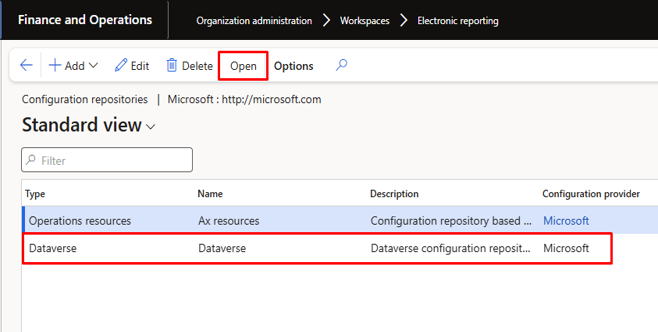
Importing via Dataverse
1- Select Repository Type
In repositories list, locate configuration repository connected to Dataverse.
2- Open Repository Connection
Click "Open" to pull database-mapped configuration files and structural assets.
3- Import Electronic Schemas
Locate the necessary invoice mappings (e.g. PINT)and click "Import".
Phase 02
AR Invoicing Parameter Setup
1- Open AR Parameters
Navigate to: Accounts receivable> Setup > Accounts receivable parameters.
2- Electronic Documents
Select the "Electronic documents" fast-tab to define target options.
3- Assign Formats (PINT)
Map imported Electronic Reporting files: Sales & Free text billing to target PINT e-invoice structures.

Phase 02
Legal Entity Setup Parameters
1- Tax Registration
- Tax Registration FastTab: Enter valid corporate tax registration identifiers.
- Seller VAT Identifier: Automatically pulled as the seller VAT marker in XML.
- Compliance Mappings: Matches regional legal requirements (e.g., Steuernummer).
2- Contact Info
- Contact Information: Click Add to assign formal communication lines.
- Required Channels: Populate target company email and telephone.
- Metadata Dispatch: Structured metadata is injected directly into payloads.
3- Primary Address
- Addresses FastTab: Establish valid primary address parameters.
- ISO Country Codes: Populating ISO codes is mandatory for PINT validation.
- Location Integrity: Set street name, city name, state, and zip code.
Phase 02
Customer Master Setup
Completing Customer Profiles
For successful electronic invoice dispatch, individual customer master accounts must be thoroughly configured. Missing metadata in any of these five core fields will cause immediate schema validation failures at the Access Point gateway.
1. Contact Information
Assign a primary contact email address. This contact email acts as the destination or notification endpoint within e-doc metadata payloads.
2. Delivery & Invoice Address
Configure physical addresses with complete street names, cities, ZIP codes, and accurate ISO-compliant country codes.
3. Method of Payment & Bank Link
Specify a valid customer payment method mapped to electronic transfer, and link the seller's target receiving bank account.
4. E-Invoice Toggle Enabled
Activate the "Electronic Invoice" toggle under the Invoice and Delivery fast-tab to trigger the schema engine upon posting.
5. Tax Exempt / VAT Number
Define the customer's formal tax registration identifier. This is injected as the buyer's VAT marker in UBL/XML.
Phase 02
Unit of Measure (UOM) Mapping
1- Open Units Form
Navigate directly in standard modules to: Organization administration > Setup> Units > Units.
2- Launch External Codes
Select target unit used (e.g.,"ea").Click External codes in the action menu strip.
3- Configure standard value
Add external code definition. In bottom Value field, enter the required standardized unit schema code.


Phase 03
Automation & Advanced Scenarios
Direct Integration
Method 1: SFTP or REST API
Customize the standard Electronic Reporting (ER) file destination tables to route outputs directly to external gateway servers.
- Direct real-time schema transmission
- Avoids local file system dependencies
- Low latency and secure connection
Low Code Workflow
Method 2: SharePoint & Power Automate
Deploy a hybrid, visual document dispatch sequence using built-in cloud orchestration modules.
- SharePoint serves as intermediate file depot
- Power Automate flow triggers on file arrival
- Flexible target routing to any access point
Key Integration Consideration: D365 generates the XML file natively via the Electronic Reporting engine. You must define a destination for the file — it does not transmit automatically. Choose SFTP/API for real-time transactions or SharePoint/PA for a low-code approach.
Phase 04
Demo: Invoice Creation & Posting
1- Create Free Text Invoice
Open Accounts receivable >Invoices > All free text invoices..
2- Populate Essential Fields
Set Method of payment and Bank account
3- Post the Transaction
Click on Post in Action Strip. This executes schema validations and generates base journal lines.

Phase 04
Demo: Send Original Document
1- Navigate to Invoice Journals
Go to Accounts Receivable >Inquiries and reports > Invoice journals.
2- Locate Customer Invoice
Filter for target invoice record(e.g., FTI-00000025 : Contoso Retail San Diego).
3- Trigger Original Dispatch
Click on Document Action Menu. Click Send and select Original.

Phase 04
Demo: XML Generation Logs
1- Monitor ER Job Logs
Open Organization Administration> Electronic reporting > Electronic reporting jobs.
2- Validate Task Execution
Locate task description: "Send the eInvoice XML".
3- Verify Status State
Check Status column is "Finished". This confirms XML payload was compiled successfully.

Phase 04
Demo: XML Invoice Payload Preview
1- Access XML Output File
Open generated file in Document attachments.
2- Verify Standard Compliances
Ensure target namespaces (e.g. PINT) map exactly to legal rules.
3- Inspect Primary Metadata
Validate core values like Issue Date, Due Date, Invoice ID, and Currency in raw schema tags.

Summary
Key Session Takeaways
Compliance First:
Modern electronic invoice frameworks enforce structured, machine-readable XML schemas (e.g., PINT)to secure business-to-government transaction validation.
Configured Process Steps:
Establish reliable base settings: ER Parameters Configuration → Globalization studio repositories selection → Accounts Receivable parameters assignment →Legal Entity mapping.
Advanced Automation Routes:
D365 creates transactional payloads locally; you must design integration rules for external routing using direct SFTP/APIs or SharePoint folder routines.
Live-Run Validation Checklist:
Prioritize checking invoice printing states, verify correct external classifications for transactional attachments, and validate schema integrity beforehand.
Product Roadmap
D365 UAE Release Roadmap
1- Microsoft Release Plan
Public Preview Stage
Target Date: July2026
Initial public sandbox releases supporting draft schemas for prototyping, trial, and early sandbox-to-sandbox connection tests.
General Availability (GA)
Target Date: December 2026
Official production release backed by formal Microsoft support. Enables early-adoption companies to transition securely before the 2027 mandates.
2- Native Document Scope
Microsoft's localization suite provides out-of-the-box system triggers to automatically compile XML/PINT payloads for major transaction pathways:
- Sales Orders
Automated e-invoice generation for bulk commercial goods shipping and logistics billing cycles. - Free Text Invoices (FTI)
Direct generation pathways mapped to ad-hoc non-inventory miscellaneous invoice postings. - Project Invoices
Complete compatibility for professional services and enterprise milestones timesheet claims.
Tax Transition Advisory:
Early testing and schema simulation during the Public Preview (July 2026) is highly recommended for Finance and ERP transformation leaders in the UAE to guarantee structural master-data compliance ahead of January 2027.
Consultant Overview
Daib Tariq
As a Functional Consultant, I work on implementing and fine-tuning Dynamics 365 Finance and Supply Chain modules. I’m passionate about helping organizations turn system capabilities into smarter, smoother business operations.

Get In Touch


Let's Talk Business
